If you are comparing Divi pricing, trying to understand the value of the Divi theme, or deciding whether the annual or lifetime plan makes more sense, this guide will help you make the right choice. Many users see Divi as just another visual builder, but the truth is that Divi is much more than a simple design tool. It is a complete web design system for building landing pages, business sites, blogs, ecommerce stores, and even professional websites for clients. When you look closely at what comes with Divi, including the builder, extra plugins, ready-made layout packs, and access to the growing Divi Marketplace, the value becomes much clearer.
This article is worth reading because it does not just list features. It explains how Divi pricing works, what you actually get with each plan, how the pricing table can help conversions, and which option is best for freelancers, agencies, beginners, and business owners. Whether you want to launch one new website, manage multiple websites, or build unlimited websites for clients, this guide will help you choose the smartest package and avoid wasting money on tools you do not need.
What Is Divi Pricing for WordPress Users in 2026?
For most WordPress users, the first question is simple: how much does Divi cost, and what do you get for the money? Divi has become one of the most recognized products in the Elegant Themes ecosystem because it gives users more than a standard wordpress theme. Instead of paying for one design and then buying extra tools later, you get a full toolkit designed for modern web design, fast page creation, and better design control.
What makes Divi pricing attractive is that it is built around value rather than strict per-site restrictions. Many competing builders charge more as your site count grows, but Divi allows users to work on many websites without being punished for growth. That is especially useful for a developer, freelancer, or agency that wants to launch client sites at scale without extra license friction.
Annual or Lifetime: Which Divi Plan Fits Your Workflow?
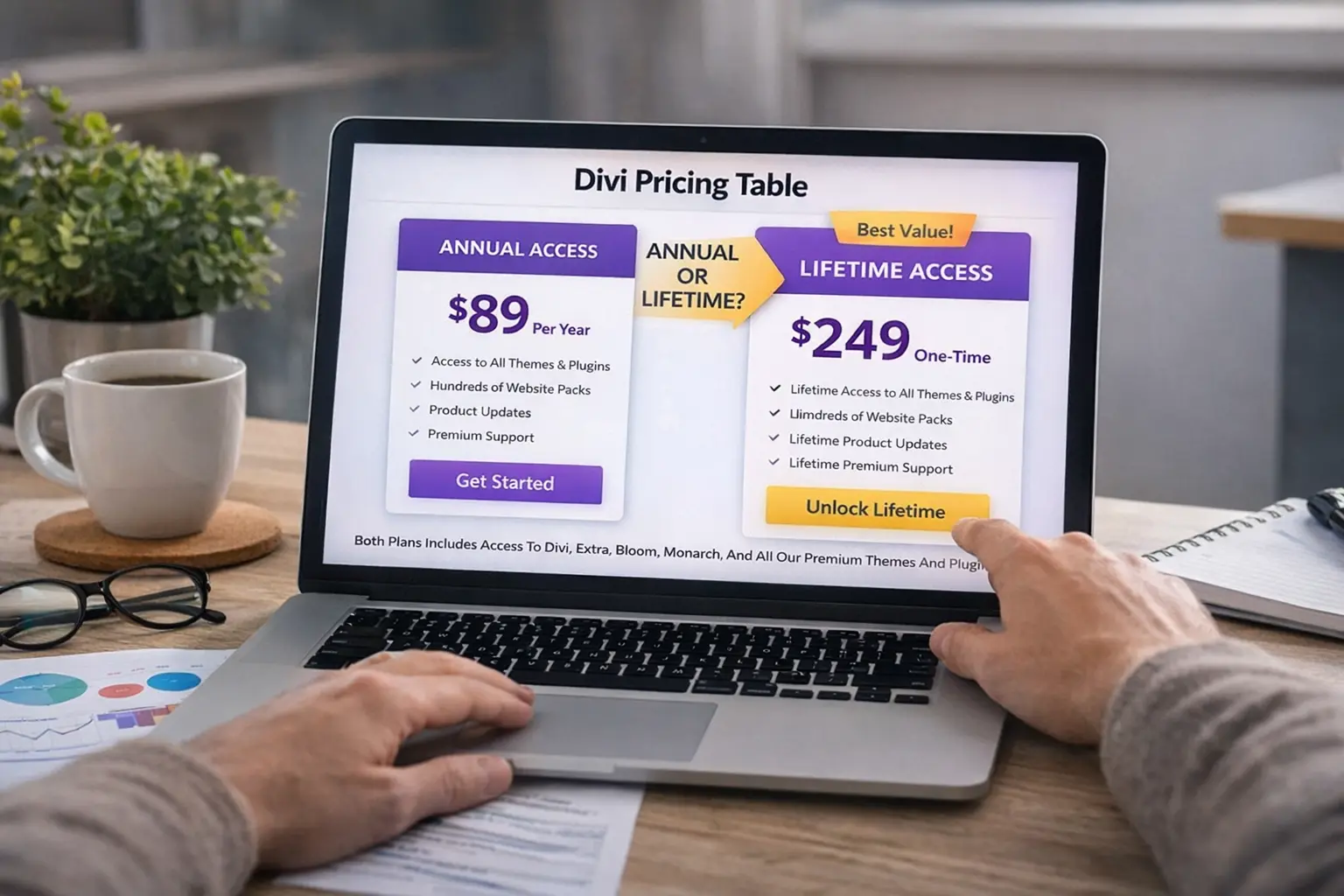
The biggest decision for most buyers is whether to choose the yearly plan or go for Divi lifetime access. The annual license is often the best fit for beginners, side projects, or anyone who wants to test the product before committing long term. It keeps the upfront investment lower and still gives you access to the full Divi theme, updates, support, and all the tools needed to launch a polished site.
The lifetime license becomes more attractive when you know you will keep using Divi. If you plan to build more than one site, redesign an existing project, or create websites for their clients, then a one-time payment can save money over time. For agencies and serious creators, lifetime access usually feels more practical than renewing every year.
The real advantage of the Divi lifetime package is peace of mind. You get a stable long-term solution, lifetime updates, and a cleaner cost structure for future projects. If you are serious about using the Divi theme regularly, the annual or lifetime choice usually comes down to short-term budget versus long-term value.
What Do You Get With the Divi Theme, Builder, and Unlimited Usage?
A lot of people ask whether Divi is just a theme or a full website solution. The answer is that Divi gives you much more than a standard divi theme purchase. When you get Divi, you also get a powerful visual builder, access to the Divi Builder experience, and supporting products like Bloom and Monarch. This makes the package appealing to anyone who wants to create websites with one connected system instead of combining random tools.
Another major benefit is the unlimited usage model. Divi is not limited to a small number of installs, which is a huge advantage if you want to launch a new website today and another one next month. For agencies and freelancers, being able to build unlimited websites without paying per website changes the economics in a very positive way.
This flexibility is one reason so many users continue to use Divi year after year. The platform is designed to help you customize pages visually, re-use a template, and maintain a consistent style across projects. For a growing Divi user, that is one of the biggest reasons Divi remains a smart investment.
How Does the Pricing Table Module Improve Conversions?
The pricing table is one of the most useful tools inside Divi when your goal is to sell. A strong pricing table makes it easier for visitors to compare offers, understand feature differences, and make quick decisions. Instead of forcing readers to scan long paragraphs, the module organizes your plans visually so the best option stands out right away.
This is especially effective when your page includes multiple offers such as yearly access, Divi lifetime, a service package, or even a client-facing bundle. A well-built pricing table can highlight value, create urgency, and reduce confusion. That makes it useful not just for SaaS pages, but also for agencies, service sites, courses, and product comparisons.
Divi also gives you enough design control to make the pricing table fit your brand. You can adjust spacing, buttons, icons, colors, and emphasis to make the section feel more customizable and conversion-focused. That means the module is not only functional, but also visually strong enough for modern landing pages.
Check Divi pricing table features now.
Can the Divi Marketplace Expand Your Layout and Module Options?
Yes, and this is where Divi becomes even more interesting for advanced users. The Divi Marketplace gives access to extra plugins, child themes, extensions, design packs, and specialized tools built around the Divi ecosystem. Instead of relying only on random third-party sellers, users can explore a more focused marketplace built for Divi-specific needs.
This helps when you want a better layout, a niche-focused module, or a faster way to launch a polished site. Maybe you need advanced forms, design effects, ecommerce enhancements, or extra divi modules for a client project. The marketplace can reduce development time by giving you ready-to-use solutions that fit naturally into the Divi workflow.
For agencies, the value is even bigger. A strong premium extension or child theme can dramatically shorten production time and help you launch better results faster. That is why the Divi Marketplace matters not just as a store, but as a real extension of the Divi ecosystem.
Is Divi Pro Worth It for Websites With Divi and Client Work?
For many users, the standard Divi package is already enough. But Divi Pro is designed for people who manage websites with Divi at a more serious level. It includes added features and pro services that can improve workflow, collaboration, and speed for client work. If you regularly build sites, manage assets, or work with a team, Divi Pro starts to make a lot more sense.
One of the biggest advantages is access to tools like Divi VIP, Divi Cloud, and features like Divi AI that can help speed up content creation and design tasks. Divi VIP is especially useful for users who want premium support, while Divi Cloud can help organize reusable assets for faster launches. For a freelancer or agency, that can mean smoother delivery and less repeated work.
This is where the choice becomes practical, not emotional. If you only need one basic site, standard Divi is probably enough. But if you handle multiple websites, client revisions, reusable assets, and faster production needs, Divi Pro offers real business value. It is built for people who want more than a theme and more than a basic builder.
How Should You Use Divi for Ecommerce and WooCommerce?
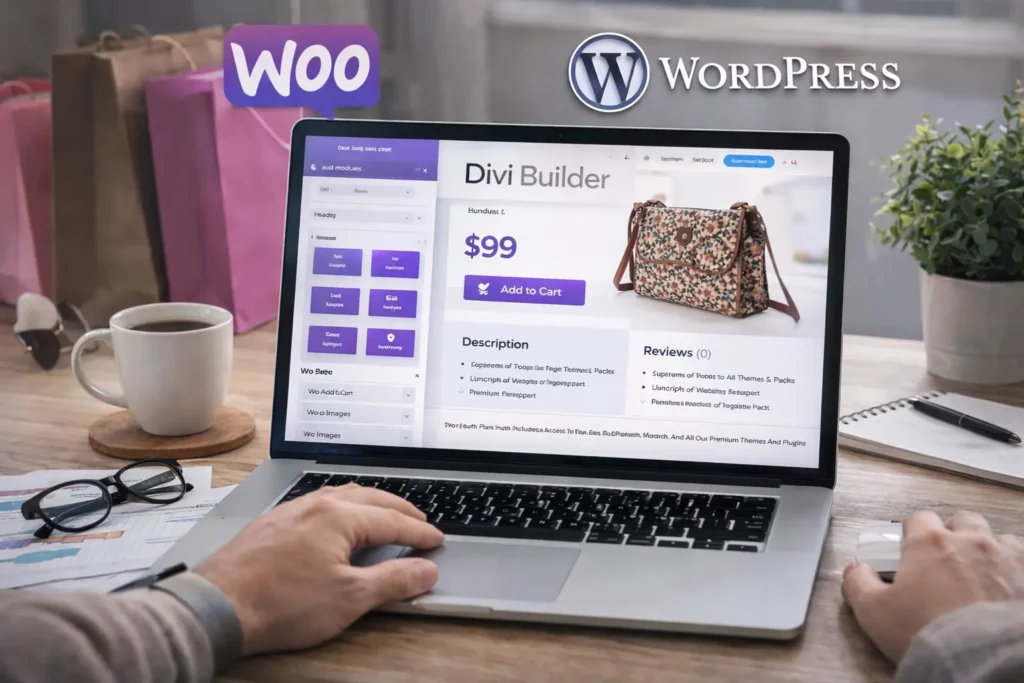
Divi can work very well for ecommerce, especially if you want more design control than a default store theme provides. With Divi, you can build branded product pages, sales sections, landing pages, and promotional blocks that look more polished than a basic store layout. This makes Divi attractive for shops that care about presentation as much as functionality.
If you use WooCommerce, Divi gives you a flexible foundation for store design while allowing you to add the right plugin or enhancements as needed. This is important because many store owners want a better-looking shop without hiring a custom developer from day one. Divi makes that easier by giving you design freedom while still working inside the WordPress ecosystem.
The smart strategy is to keep the store focused and avoid too many extra tools. Use only the plugins and layouts that genuinely improve sales or user experience. When done well, a Divi-powered store can be both attractive and practical for modern ecommerce growth.
What Makes a High-Converting Divi Layout for Sales Pages?
A high-converting layout is not about adding more effects. It is about helping visitors move from interest to action with less friction. The best Divi sales pages usually begin with a strong headline, clear benefits, trust signals, and a focused CTA. After that, sections like testimonials, feature comparisons, and a pricing table help support the buying decision.
Divi is strong here because the builder makes it easy to structure pages visually. You can place proof near the offer, highlight the right benefits, and create sections that feel polished instead of cluttered. That makes it much easier to design pages for services, software, memberships, and product sales with a more strategic flow.
The best part is that you can save strong layouts and reuse them later. That means every Divi website does not need to start from zero. As Divi 5 and the new Divi direction continue improving workflow, reusable design systems will become even more valuable for agencies and brands that want speed plus consistency.
Check Divi layout options now.
Should You Trust Demos, FAQ Sections, and Coupon Codes?
A polished demo can help you see what Divi can do, but it should not be the only reason you buy. Demos are designed to impress, not always to reveal every limitation. That is why smart buyers should read the details, review the real package features, and compare them against their own goals before they purchase Divi.
A useful faq section is also important because it answers practical concerns: how the Divi license works, what support is included, whether you can use it on client sites, and how updates are handled. This is where serious buyers get the clarity they need before choosing between yearly, one-time, or higher-tier plans.
The same caution applies to coupon codes. A huge discount headline may look exciting, but the real value often comes from understanding the overall package, the included tools, and the money back guarantee. If you are comparing options, remember that Divi offers a 30 days refund policy, which reduces risk and makes testing the platform much easier.
Who Should Buy Divi Yearly, Divi Lifetime, or the Full Bundle?
The yearly plan is best for users who want a lower starting cost and are still testing the platform. It is a smart option if you are launching one new website, experimenting with a design direction, or simply want to learn the system before making a larger commitment. For many beginners, this is the easiest way to start.
The Divi lifetime plan is better for users who already know they like the product and plan to use it long term. If you expect to launch client projects, build more than one site, or rely on the platform as part of your business, the lifetime license often offers better overall value. That is especially true if you want stability and do not want yearly renewals eating into profit.
The full bundle with Divi Pro, Divi VIP, and added tools is best for users who treat Divi like a business platform rather than just a design tool. If you want to build faster, manage team assets, improve production, and support websites for their clients, the expanded package becomes much more attractive.
What is Divi pricing in 2026?
At the time of writing, Divi offers a few clear buying paths. The standard Divi membership is listed at $89 billed yearly, while Divi Lifetime is listed at $249 as a one-time payment. For users who want the broader pro ecosystem, Divi Pro is listed at $277 billed yearly, and Divi Lifetime + Pro is shown as $297 today for lifetime Divi access plus discounted yearly pro services. That structure gives buyers a low-cost entry point, a one-time ownership option, and an upgraded plan for agencies and power users.
What makes this pricing model attractive is that Divi is designed for unlimited websites, which is a huge advantage for freelancers, agencies, and developers who do not want to pay again every time they launch a new site. Instead of getting boxed into per-site limits, you can scale your work inside one ecosystem and keep your toolkit consistent across projects. That is one of the biggest reasons Divi keeps showing up in serious WordPress buying decisions.
Check Divi pricing now.
Annual or lifetime: which Divi plan makes more sense?
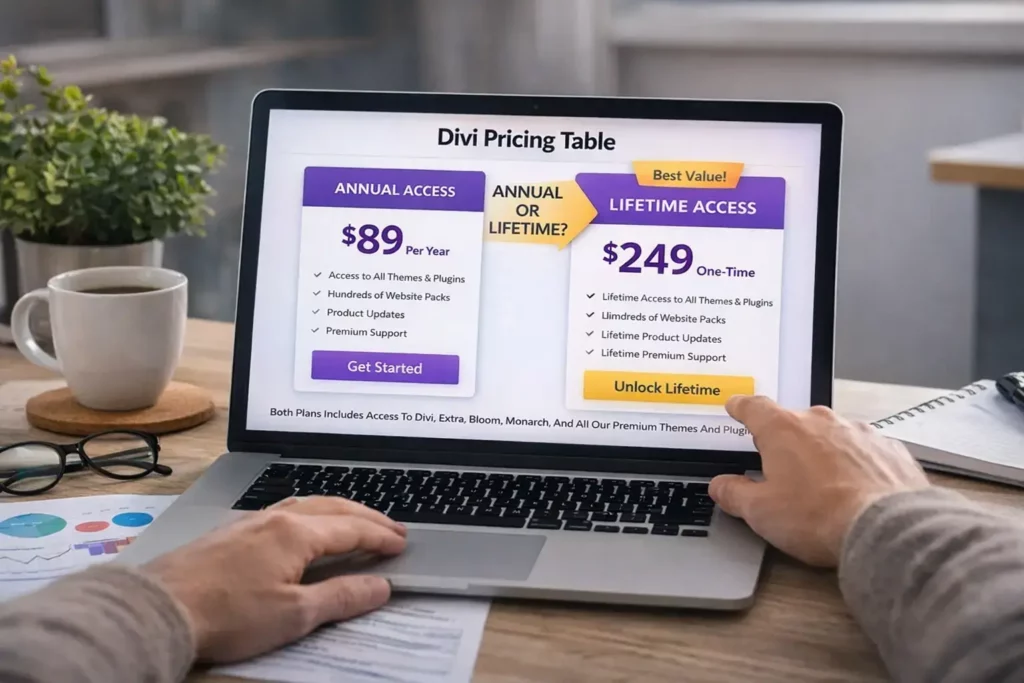
For most buyers, the first real decision is whether to choose the yearly plan or go straight to lifetime. If you are just testing the platform, building one site, or want a lower upfront cost, the annual option is the easier starting point. It still gives you the full Divi experience, access to updates during your active subscription, and a low-risk way to see if the builder fits your workflow. That makes it a smart entry point for beginners and solo site owners.
The lifetime option becomes more attractive when you already know you will keep using Divi. If you expect to build several websites, redesign client projects, or use Divi as part of your long-term business, the one-time license starts looking much better. You pay once for core Divi access, and that can be more cost-effective than renewing year after year. If you want a deeper comparison before you decide, read our guide on Divi Lifetime vs Yearly.
For agencies, this is often the simplest math in the whole buying process: more future projects usually make lifetime the stronger value.
What do you get with the Divi theme and builder?
A lot of people still think Divi is just a WordPress theme, but the package is much bigger than that. The official membership includes Divi, Extra, Bloom, and Monarch, plus access to the visual builder and usage on unlimited websites. That makes it less like a single theme purchase and more like a connected design toolkit for WordPress site owners who want flexibility without juggling too many separate plugins.
The builder itself is one of the biggest selling points. It lets you create pages visually, customize sections without needing custom code for every change, and speed up production with reusable layouts and templates. For freelancers and business owners, that means less time wrestling with design and more time launching pages that actually convert. If you want the main product, start here with Divi. If you also want email opt-ins and social sharing built into your toolkit, look at Bloom and Monarch.
For more ideas on extending the platform, also see our updated guides to the best Divi plugins and the newer list of best Divi plugins for 2026.
Get Divi now.
Why does the Divi pricing table module matter so much?
One reason Divi works well for commercial websites is that it includes useful conversion-focused modules out of the box. The official Divi Pricing Tables Module is designed to display services, packages, and subscription offers with fields for the title, subtitle, currency, frequency, price, feature list, and call-to-action button. In plain terms, that means you can build a clean pricing section without adding another plugin or relying on a clunky shortcode workaround.
A good pricing table does more than show numbers. It helps visitors compare options quickly, see what makes one plan better than another, and move toward a decision with less confusion. That matters whether you are selling services, digital products, memberships, or SaaS-style plans. Divi gives you enough control over spacing, colors, emphasis, and buttons to make the section fit your brand while still keeping it clear and conversion-focused. If you want to explore that feature directly, check the Elegant Themes Pricing Table page.
If your site depends on offer pages, service packages, or product tiers, this module alone can save time and improve CTR on your CTA buttons.
Check the Divi pricing table module now.
Is Divi Pro worth it for freelancers, agencies, and client work?
Divi Pro is where the conversation shifts from simple theme pricing to business workflow. According to Elegant Themes, Divi Pro includes Divi plus its extended pro services, including Divi AI, Divi Cloud, Divi VIP, Divi Teams, and more. It is positioned for web professionals who want to build unlimited Divi websites faster with AI tools, cloud storage, and VIP support.
That means Divi Pro is not just about adding shiny extras. It is about reducing friction if you manage client projects, repeat layouts, shared assets, and content production. Divi AI can help with layouts, text, code, and images inside the builder. Divi Cloud helps store and reuse assets across projects. Divi VIP adds support benefits and also includes 10% off Divi Marketplace purchases, which can matter if you buy premium extensions regularly.
If you are comparing plans, read our full Divi Pro Review and the side-by-side breakdown in Divi Pro vs Divi Lifetime. Then check the offer pages for Divi Pro pricing, Divi AI, Divi Cloud, Divi VIP, and Divi Team.
For anyone building websites for clients every month, this is the section of the ecosystem that usually changes the buying decision.
Check Divi Pro pricing now.
Does Divi 5 make Divi a better long-term buy?
Yes, and this is one of the strongest reasons Divi still matters in 2026. Elegant Themes states that Divi 5 comes with all Divi memberships and that upgrading is free for everyone with a Divi membership. The company also announced the official release timing around late February 2026 and has already moved into post-release updates like Divi 5.1, which shows active development rather than a stalled product line.
For buyers, that matters because pricing is not just about what you get today. It is about whether the platform still looks future-proof a year from now. A theme ecosystem that keeps evolving can justify a higher upfront investment, especially if you plan to use it on multiple sites. If you want to follow the rollout and compatibility story more closely, read our internal post on the Divi 5 release date. You can also go straight to the product page here: Divi 5.
If you are buying for longevity, Divi 5 strengthens the case for Divi more than any sales headline does.
Explore Divi 5 now.
Can Divi work well for ecommerce and WooCommerce?
Divi can be a very solid choice for ecommerce, especially if you care about presentation, branded landing pages, and flexible sales sections. The platform works well when you want more design control than a generic store theme provides, and the broader Divi ecosystem also includes ecommerce-focused products and child themes in the marketplace. That gives store owners more ways to shape product pages, promo areas, and offer sections without starting from scratch.
The smarter ecommerce approach is not to overload your site with every feature you can find. It is to combine Divi with the right tools and keep the store focused on speed, clarity, and conversion. If WooCommerce is part of your plan, start with our guide to the best Divi plugins for WooCommerce. If you want ecommerce-ready design shortcuts, take a look at Divi Cart Pro Child Theme and Molti Ecommerce Divi Child Theme.
A clean ecommerce stack usually earns more than a flashy but bloated one.
Check Divi ecommerce-ready tools now.
How does the Divi Marketplace add more value after you buy?
The Divi Marketplace is one of the most underrated reasons to buy into the ecosystem. The official marketplace includes categories for child themes, extensions, and layouts, which means you can expand your site with products built specifically for Divi instead of relying on random general-purpose tools. It also features well-known products like Divi Pixel and DiviFlash, which shows that the marketplace is not empty filler but a real commercial ecosystem.
For site owners, that matters because marketplace products can shorten production time and help you launch a better-looking website faster. Instead of building every section from zero, you can start from a polished child theme, add a targeted extension, or buy a layout pack that matches the niche you are serving. If you want to explore that angle further, read our guides to the best premium Divi child themes and the best Divi layout packs for agencies and marketing websites. You can also browse Divi layouts & layout packs, check Molly Child Theme, or look at Avanti Divi Child Theme for more design inspiration.
If you plan to build often, the marketplace can add value long after the original Divi purchase.
Browse the Divi Marketplace value path now.
What internal resources should you read before buying Divi?
A smart buyer should not rely on one sales page alone. The best way to make a confident decision is to compare pricing, workflow, add-ons, and long-term value from multiple angles. That is why internal content matters. If your focus is plan comparison, start with Divi Lifetime vs Yearly and Divi Pro vs Divi Lifetime. If your focus is advanced features, read Divi Pro Review and Divi AI Review.
If your goal is building better websites after purchase, the next layer of content becomes important. You may want the ultimate guide to Divi image sizes, our post on Divi SEO, or our curated lists of the best Divi plugins and best Divi plugins for 2026. These are the kinds of internal links that help readers move from “Should I buy Divi?” to “How do I get the best results once I own it?”
Better internal content also improves trust, and trust usually improves clicks.
See the full Divi buying path now.
Should you wait for discounts, coupon codes, or seasonal sales?
A lot of people delay their purchase because they hope for a bigger deal later. Sometimes that works, but it can also slow down projects you could already be building today. The smarter move is to compare the actual product value, the time savings, and the plan that matches your workflow. Elegant Themes also runs official discount pages from time to time, and the company has promoted marketplace credit alongside offers, so there can be real value in watching official promotions instead of chasing random coupon blogs.
If you do want to watch seasonal promos, keep an eye on pages like Elegant Themes Black Friday Layouts and Elegant Themes Cyber Monday. But for most buyers, the bigger win is choosing the right plan now rather than waiting too long and losing momentum on a new website, redesign, or client build.
Time saved often matters more than the last small discount.
Check the latest Divi pricing and offers now.
So, who should buy Divi yearly, lifetime, or Divi Pro?
Choose the yearly plan if you want the lowest entry cost, you are still testing the builder, or you only need Divi for a smaller project right now. Choose lifetime if you already know you like the platform and expect to use it across multiple websites over the long term. For many freelancers and agencies, that is the cleanest decision because it turns Divi into a one-time core investment rather than an ongoing renewal.
Choose Divi Pro if Divi is part of your actual business system. If you want AI tools, reusable cloud assets, team collaboration, better support, and stronger marketplace value, Pro is the version most likely to save time every week. If your workflow is simple, standard Divi is enough. If your workflow is growing, Pro becomes much easier to justify. The easiest next step is to compare Divi pricing, review Divi Pro pricing, and then make the decision that fits where your business will be in the next 12 months, not just today.
The right plan is the one that supports the way you actually build.
Check Divi Annual or Lifetime now.Check Divi Pro now.
Final Thoughts on Divi Pricing, Layout Value, and Long-Term Use
Divi remains one of the most practical choices for anyone who wants flexibility, visual control, and room to grow inside WordPress. It is strong enough for a solo creator, scalable enough for a freelancer, and efficient enough for an agency handling client work. That is why Divi continues to stand out in a market crowded with alternatives like Wix and Squarespace.
The real strength of Divi is not just the headline pricing. It is the complete value system behind it: the builder, the visual workflow, the pricing table tools, the ability to customize designs, the Divi Marketplace, and the option to scale into Divi Pro when your needs grow. If you are building a serious site or business, that combination makes Divi much more than just another theme.
Whether you choose yearly, Divi lifetime, or the advanced package, the smartest move is to choose based on your workflow, not just the lowest price. If you plan to build often, serve clients, or grow a long-term online business, Divi gives you a system that can grow with you.
If you are trying to figure out Divi pricing, compare the Divi theme plans, or decide whether the annual or lifetime option makes more sense, this guide will help you make the right choice. Divi is no longer just a simple design tool for WordPress users. It has grown into a full website-building ecosystem with a visual builder, premium add-ons, AI tools, cloud features, and a large marketplace of layouts, extensions, and child themes. That makes the buying decision more important, because the right plan can save you money now and make future projects much easier.
This article is worth reading because it goes beyond a basic price comparison. You will learn what is included in Divi, how the pricing table module can help conversions, when Divi Pro is worth the extra cost, how Divi 5 changes the value of the platform, and where the Divi Marketplace can unlock even more design flexibility. If you want one clean answer before you buy, this is the guide to read first.
Check Divi pricing now.
Key things to remember
- Divi gives buyers a standard yearly option, a one-time lifetime option, and an expanded Divi Pro path for more advanced workflows.
- The main value of Divi is not just the theme. It is the wider ecosystem that includes the builder, Bloom, Monarch, marketplace products, and pro services.
- The Pricing Tables Module is useful because it helps present offers clearly and can improve conversions on service and product pages.
- Divi Pro is best for freelancers, agencies, and client work where AI, cloud storage, team collaboration, and VIP support save real time.
- Divi 5 strengthens the long-term value of the platform because it is included with memberships and continues receiving active updates.
- The Divi Marketplace adds extra value through child themes, extensions, and layout packs built specifically for Divi.
- If you want the most balanced next step, start by comparing Divi pricing and Divi Pro pricing, then follow the internal guides linked throughout the article.